Early access  ·  Explore Pro features for 1 day  ·  No credit card
Your freelance business, with less busywork

Your next client starts with a stronger proposal.

Find relevant jobs on Freelancer.com, draft proposals around your skills, and keep client replies moving. One workspace to help you start freelancing or grow the business you already run.

1-day trialNo credit cardYou approve every bid

You bring the ambition. Bring your judgment, too.
DealPrinter helps with the search, the draft and the follow-up. You choose the work and make the client promises.

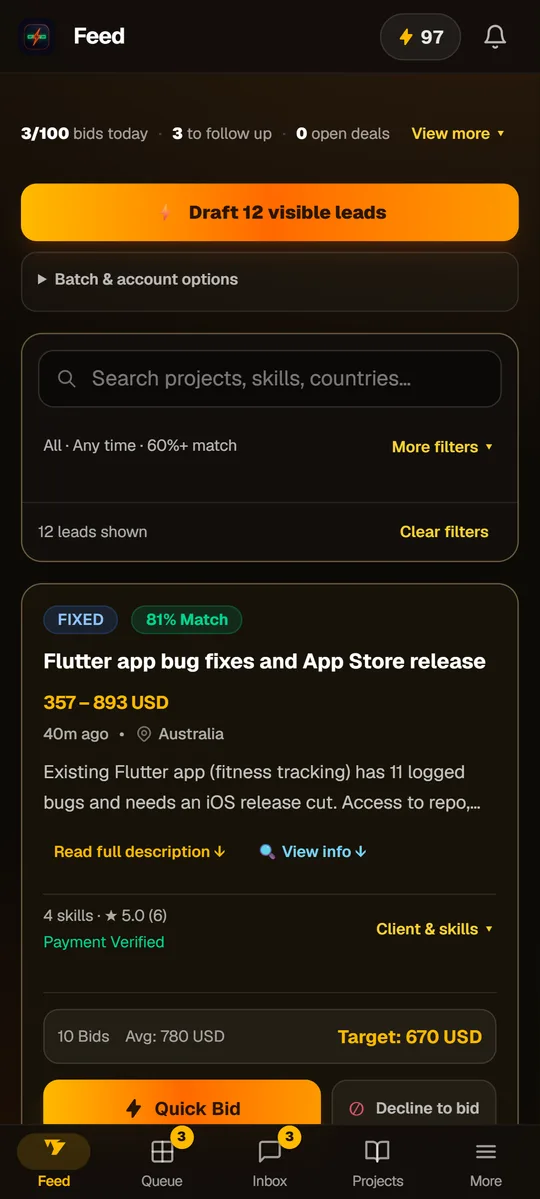
DealPrinter Feed showing a scored freelance job, client information and a proposal drafting button
Find your fitRelevant leads.
A clearer next step.
Your approval comes firstDraft → Review → Send
Product preview · sample projects and balances
Find work that fitsScored against your profile
Skip the blank pageDrafts you can make your own
Keep the conversation movingClients and replies in one place
Your first steps, explained

From signup to your first project.

A guided quick start: create your Freelancer account, connect it, bid, reply and request delivery from our dev team.

3:14 · Full HD · English narration + on-screen captions · Illustrated steps and sample app data

Download MP4 ↓

Prefer us to build it? Use Hand it to us to request a delivery quote of 40–80% of the awarded project value, depending on scope. Scope, delivery date and revisions are agreed in each written quote. You review the exact price and timeline first. Acceptance reserves your credit; delivery charges it. Marketplace fees and other costs are separate.

Read the step-by-step transcript

Your next project starts here.

Let's get you started with DealPrinter. We'll connect your Freelancer account, find a project, send a bid, and show you how our development team can help with delivery.

First, create your Freelancer profile.

First, head to Freelancer dot com and choose Sign Up. Create your account, then choose the option to find work.

Verify your email, add your skills, a profile photo, and work samples. Complete any verification Freelancer asks for before you bid.

Join DealPrinter.

Now open the Volty website and choose Try it free. Enter your name, email, and password, then verify your email.

Your free day starts when you connect your live Freelancer account. It includes five bids and two AI replies, including one deep reply. No card is needed.

Get your access token.

Next, open Freelancer's developer settings using the link below this video. Make sure you're signed into your own account, in the live environment.

Find Personal Access Token, select Generate, and copy the token privately. This is like a password, so keep it out of chats and screenshots.

Connect it to DealPrinter.

Back in DealPrinter, open Settings, then Freelancer account. Paste it into Personal access token and click Connect. Check that your own username is connected.

The token expires after thirty days, so reconnect when needed. Until you connect, the app shows demo data.

Find a project that fits.

In Feed, open a suitable project. Read the brief, budget, and deadline. Choose work you can deliver, or arrange a capable team for.

Select Quick Bid to prepare a proposal. You'll find the draft in your Queue once it's ready.

Make the bid your own.

Review the proposal, price, and delivery time. Edit anything that doesn't fit, then choose Approve and place bid when you're ready.

That sends a real bid. You'll need enough bid allowance on both Freelancer and DealPrinter.

Keep the conversation going.

When a client replies, open their conversation in Inbox or Chat. Write a reply, or choose Draft AI response.

Read it, make it yours, then press Send. Confirm the scope, deadline, and milestones. Keep client communication and payments on Freelancer.

Let our team help build it.

Want our team to handle delivery? Open Hand it to us, and select your awarded project, or Any other project.

The brief, project price, linked milestones, and synced chat fill in for you. Review what you share, confirm the deadline, attach any files, and request your quote.

Know your costs before you accept.

Our team's delivery quote is forty to eighty percent of the awarded project value, depending on scope. Review the exact price and timeline in Your projects.

For a thousand dollar project, delivery would be four hundred to eight hundred dollars. The remainder is before marketplace fees, tax, and other costs.

Accepting reserves the quoted amount from your credit. You may need an active plan and a top up first. You're charged when we deliver. Review the work before sharing it with your client.

Start with one great fit.

You manage the client. We can help with the agreed delivery. Start with one suitable project, check your costs, and build from there. Clients and income aren't guaranteed.

Download captions

Start where you are

Your first proposal.
Or your next chapter.

You don’t need the same starting point to benefit from a better process. Choose the path that sounds like you.

I’m starting out.

You want to turn a skill into a freelance service, but finding work and writing the first proposal feel overwhelming.

  1. Choose a service you can deliver and set up your Freelancer.com profile.
  2. Use DealPrinter to explore relevant jobs and understand what clients need.
  3. Review a proposal draft, set a realistic price and approve your bid.
Start my first proposal

No coding needed to use the app. You do need a service, an eligible marketplace account and a delivery plan.

I already freelance.

You can do the work. You want less time lost to job hunting, repetitive proposals and scattered client follow-ups.

  1. Connect your account and review leads ranked against your profile.
  2. Edit tailored proposal drafts and approve the opportunities worth pursuing.
  3. Manage replies, track projects and organize delivery from one workspace.
Build my client pipeline

Built for independent freelancers and small agencies. Use your own skills, or a delivery team you have vetted.

How it works

From opportunity to conversation.
With you in control.

01 / FIND

Give good opportunities your attention.

Review a scored feed with project budgets, skills and available client details. Pick work that matches what you can deliver.

02 / PROPOSE

Make a strong first impression.

Start with a draft built around the brief and your profile. Check the scope, price and promises, then approve the bid.

03 / FOLLOW THROUGH

Turn replies into a clear next step.

Keep the conversation, project and delivery plan organized. Deliver yourself or work with specialists you trust.

Take a look inside

Less tab switching.
More clarity.

See the screens you’ll use to find opportunities and review proposals. These previews use sample data.

Works in your browser. Get the Android app ↗

Feed preview: a matching freelance project with budget and client details

Feed · sample projects, not live customer results

A small first step

Try the workflow before choosing a plan.

Your free day includes Pro features with 5 bids, 2 AI replies, and 1 deep reply within that reply allowance. Explore the feed, review a draft and see whether it fits the way you work.

Start my free day No card. No automatic paid subscription.
Make the numbers work

Price the work.
Know what’s left.

Explore a project scenario before making a client promise. Change the assumptions to suit your service and delivery costs.

Illustrative amount left from this project

$300.00
Client payment
$600.00
Delivery / vendor cost
−$200.00
Assumed marketplace fee
−$60.00
Other costs entered
−$40.00

A scenario, not an earnings forecast. This assumes the work is won, delivered and paid. Check actual marketplace fees, including minimum fees, and account for your time, tax, software and any other costs.

Explore the monthly calculator ↗
Simple monthly plans

Start small.
Grow when you’re ready.

Try it free for one day, then choose the allowance that fits your workflow.

Starter

Build a routine

For a focused freelance pipeline.

$20/ month

  • 20 bids per day
  • 5 AI replies per day, including 1 deep reply
  • Scored leads and editable proposal drafts
  • Approval queue, client conversations and projects
  • Vendor bench and margin tracking
Try DealPrinter free

Pro

Room to grow

For a more active freelancer or small agency.

$99/ month

  • 100 bids per day
  • 25 AI replies per day, including 5 deep replies
  • Everything in Starter
  • Batch drafting and background draft preparation
  • Analytics for replies, scripts and margins
Explore Pro with a free day

No automatic charge when the trial ends. Paid subscriptions renew monthly until cancelled. Marketplace fees and delivery costs are separate. Your Freelancer.com account must also have the required bid allowance. Upgrades credit eligible unused paid time; confirm the amount in Billing before paying.

Before you jump in

A few things
worth knowing.

Clear expectations make a better start.

Ask us a question ↗

Can I use this if I’m new to freelancing?

Yes. You don’t need coding skills to use DealPrinter. Start with a service you can deliver, an eligible Freelancer.com account and a useful profile. The app helps you find relevant opportunities and prepare proposals; you still need to judge the work, agree the scope and deliver what you promise.

Does DealPrinter guarantee clients or income?

No. Clients choose who they hire. Your skills, profile, proposal, pricing and delivery all matter. DealPrinter gives you tools for finding leads, preparing drafts and managing follow-ups. The calculator and app previews are illustrations, not customer earnings claims.

Does it send bids without my approval?

Every bid requires your approval. Review and edit the draft, check the price and delivery commitment, then choose whether to send it. DealPrinter uses Freelancer.com’s API under your connected account. You remain responsible for your activity and the marketplace’s rules.

What is included in the free day?

You can explore Pro features with 5 bids and 2 AI replies, including 1 deep reply. No credit card is required, and the trial does not automatically turn into a paid subscription. Your free day starts after you verify your email and successfully connect your live Freelancer account. The trial is subject to account eligibility and one-trial-per-person checks.

Do I need my own AI account or API key?

No separate AI key is needed for the included drafting features. Your plan sets the daily allowance. You do need your own Freelancer.com account to connect and submit bids.

Can I deliver the work myself or use a team?

Either. Deliver it yourself, organize specialists you have vetted in the vendor bench, or request a separate delivery quote from Volty at 40–80% of the awarded project value, depending on scope. Scope, delivery date and revisions are agreed in each written quote. Request an estimate before promising delivery to a client. Select an awarded project in Hand it to us to auto-fill its brief, price, linked milestones and synced chat, then review what you share. Subscription fees do not include project delivery.

Can I upgrade or cancel my plan?

Yes. Eligible upgrades apply credit for unused paid time and show the amount before payment. Manage your subscription in Billing and follow the steps for your payment provider. PayFast cancellation or downgrade assistance is available through support. No long-term contract is required.

Which marketplace does it work with?

DealPrinter currently connects to Freelancer.com. Upwork is not currently supported. You can use the app in your browser or get the Android version from our download page.

The founder of Volty
Built by Volty. Made for the work behind winning work.

From choosing a lead to reviewing a proposal and following up with a client, DealPrinter brings the process into one workspace. We’re in early access and improving it with hands-on feedback.

Make your next move

You don’t need another open tab.
You need a place to start.

Find an opportunity. Review a draft. Take the next step with DealPrinter.

Start my free day 1-day trial · No card · No automatic paid subscription